If you have ever needed to work with sentences inside an HTML page — highlight them, translate them, read them aloud — you quickly run into a deceptively awkward problem. The text is not plain text. It is interspersed with tags, attributes, inline elements, and markup that your sentence detector has no business reading.
This post walks through an exploratory JavaScript project — html-sentence-segmenter — that I built to figure out how to do this properly. It is not a polished, reusable library. Think of it as a working proof-of-concept that demonstrates the approach, with a live demo using Wikipedia articles.
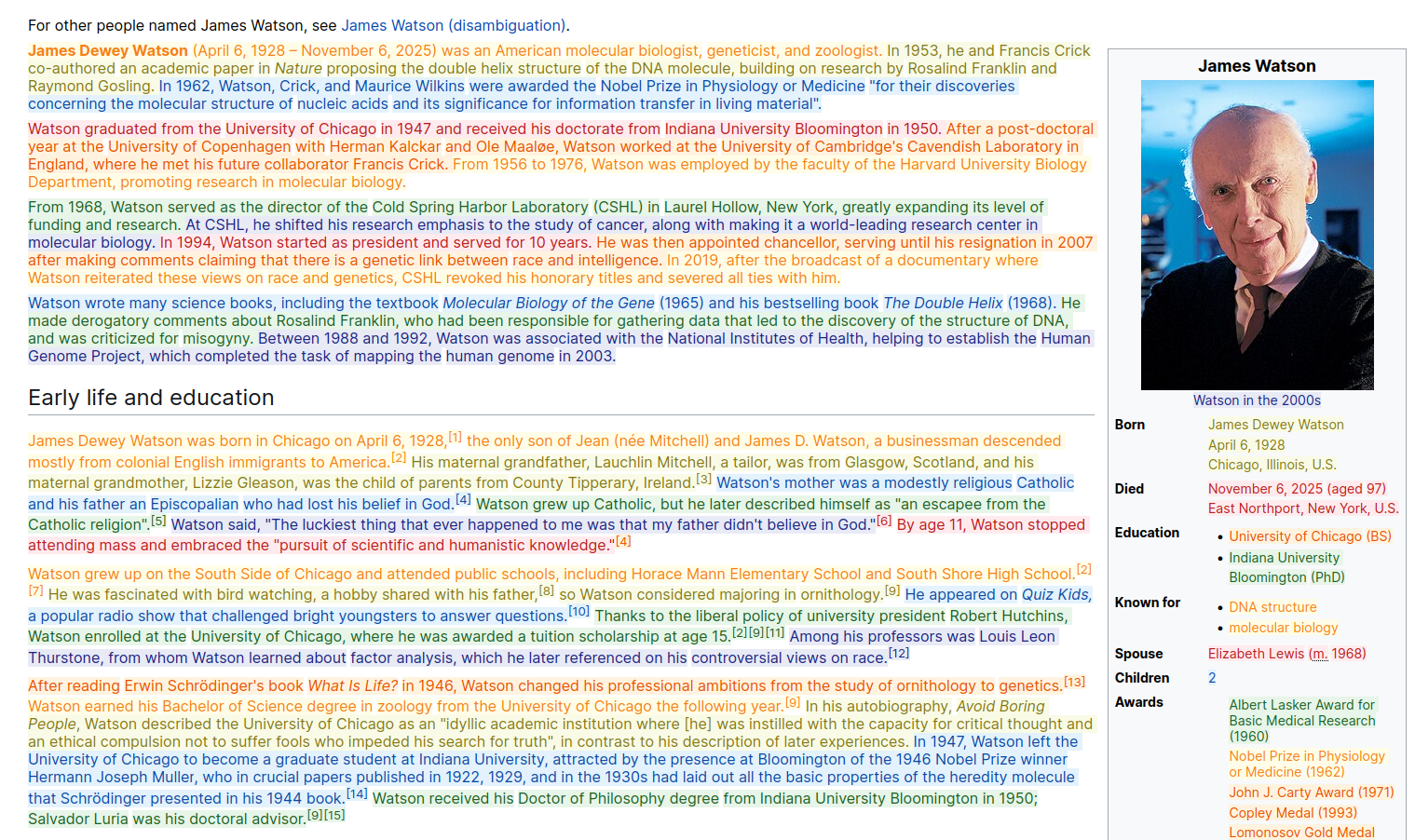
A live demo is available if you want to see the result before reading through the mechanics.
The Problem with the Obvious Approaches
The obvious approach is to strip the HTML tags, run a sentence segmenter on the resulting plain text, then map the boundaries back. This falls apart as soon as you try the mapping step: the positions in the plain text do not correspond to positions in the original HTML, because tags have been removed. You cannot tell the caller “the sentence starts at offset 42” if offset 42 means something different in the HTML and in the stripped text.
Another approach is to work at the DOM level — walk the Text nodes and split them. But DOM offsets are character offsets within individual text nodes, not within the HTML string. A sentence that spans an inline element like <a href="..."> or <em> is split across multiple text nodes, so you cannot even express it as a single contiguous range.
What we actually want is: given an HTML string, return sentence boundaries as character positions in that same HTML string — the kind of positions you could use to extract or annotate text without losing the markup.
The Pipeline
The solution is a six-stage pipeline. Each stage transforms the data into a form that the next stage can use. You can read the full details in the DeepWiki architecture page and segmentation pipeline page, but here is the essential picture.
Stage 1: Parse HTML into a syntax tree
Rather than using the browser’s own DOM parser (which gives you a live DOM tree, not character positions), the library uses web-tree-sitter — a WebAssembly port of the tree-sitter parser — with the HTML grammar. This produces a concrete syntax tree where every node carries exact startIndex and endIndex positions within the original HTML string. Those positions are what we ultimately want to map back to.
Stage 2: Collect text nodes, skipping noise
The syntax tree is traversed to find all text nodes — the actual visible content. Elements like <script>, <style>, <code>, and anything else configured in excludeElements are skipped entirely, along with all their descendants. Each surviving text node is recorded as a TextNodeInfo object carrying its startIndex, endIndex, and raw text content.
Stage 3: Flatten to plain text
The collected text nodes are concatenated into a single plain string. A parallel array of NodeLinearRange objects records where each text node’s content sits within that flat string. This gives us a clean input for sentence detection, plus a map back to the individual nodes.
Stage 4: Detect sentence boundaries
The flat plain string is passed to sentencex-wasm — a WebAssembly build of the sentencex sentence segmenter — along with a language code. It returns an array of {start_index, end_index} pairs, all as offsets within the flattened text. This is where the language-aware logic lives: abbreviation lists, language-specific punctuation, edge cases like Dr. and U.S..
A separate post covers the Rust rewrite of sentencex that this WASM build is based on.
Stage 5: Map boundaries back to individual nodes
Now comes the coordinate translation. The sentence boundaries from stage 4 are in flattened-text space. Each boundary is matched against the NodeLinearRange array to find which text nodes it overlaps, and per-node local offsets are computed. A sentence that spans an inline <a> element, for example, will produce two slices — one for the text before the link, one for the text inside it — both tagged with the same sentence ID.
Stage 6: Convert to HTML character positions
The local per-node offsets are converted back to absolute positions in the original HTML string using each text node’s startIndex from stage 2. The formula is simply:
htmlPosition = textNode.startIndex + slice.localStart
The final output is a Map from sentence ID to an array of {start, end} pairs in HTML character space. One sentence, multiple fragments if it spans multiple elements — but all positions point into the original HTML string.
The three coordinate spaces
There are three distinct coordinate spaces at play, and keeping them straight is the crux of the whole design:
| Space | Description |
|---|---|
| Global HTML position | Character offset in the original HTML string (includes tag characters) |
| Flattened text position | Character offset in the concatenated plain text string |
| Local node position | Character offset relative to the start of a single text node |
The pipeline moves: HTML → flattened text (for sentence detection) → local node positions → back to HTML positions (for the final output). Mixing these up is the most common source of off-by-one errors, and the code is structured specifically to make each conversion explicit. See the data structures page for the full breakdown.
Highlighting Without Touching the DOM
The demo application fetches a Wikipedia article, runs the pipeline, and highlights each sentence in a distinct color. The interesting part is how it highlights: using the CSS Custom Highlights API, with no DOM modifications at all.
The traditional approach for visual highlighting is to wrap spans around text:
<p><span class="s1">First sentence.</span> <span class="s2">Second sentence.</span></p>
This has real costs. It modifies the live DOM, which breaks any code holding references to the original nodes. It cannot easily span across element boundaries. And undoing it is messy.
The CSS Custom Highlights API works differently. You create Range objects — each Range identifies a span of text by (startNode, startOffset, endNode, endOffset) — and register them under a named Highlight in CSS.highlights. A corresponding ::highlight(name) rule in CSS applies the visual style. The DOM is never touched.
const range = new Range();
range.setStart(textNode, startOffset);
range.setEnd(textNode, endOffset);

const highlight = new Highlight(range);
CSS.highlights.set("sentence-1", highlight);
::highlight(sentence-1) {
  background-color: #e3f2fd;
  color: #0d47a1;
}
The demo defines seven named highlight colors (red, blue, orange, green, yellow, indigo, lime) and cycles through them so adjacent sentences always get different colors. All the ranges from a page-level segmentation pass are registered at once, and clearing them is a single CSS.highlights.clear() call.
The one wrinkle: segmentHtml returns positions as offsets into the innerHTML string, but Range objects work on DOM TextNode references. The demo bridges this by extracting the literal text of each sentence fragment from the HTML string and then searching for it inside the live DOM text nodes. It is not the most elegant approach, but it works for this exploration. See the sentence highlighting page for the details. Browser support for the CSS Custom Highlights API requires Chrome/Edge 105+ or Firefox 131+.
Use Cases
The reason to do all this, rather than just stripping tags and forgetting about it, is that you often need the HTML positions downstream. A few examples:
Machine translation sentence by sentence. Content Translation on Wikipedia translates Wikipedia articles by sending one sentence at a time to a translation service. To do that, you need to know where each sentence starts and ends in the source HTML — not just in plain text — so you can reassemble the translated HTML preserving markup like links, bold, and references.
Text-to-speech with synchronized highlighting. A text-to-speech engine reads aloud while the corresponding sentence is highlighted on screen. This requires mapping each spoken sentence to its visual position in the document. Character positions in the original HTML are exactly what you need.
Reading aids and accessibility tools. Tools that help readers focus by highlighting one sentence at a time as they read need to locate sentences within the HTML structure, not a stripped copy of it.
Annotation pipelines. If you are building a corpus from web content and want to annotate at the sentence level, having HTML-accurate positions lets you round-trip back to the source markup.
Proofreading and editing tools. Sentence-level editing assistance — grammar checking, style suggestions, inline translation — works best when the tool can identify and modify exactly one sentence within the HTML without disturbing the rest.
Exploring the Code
The project is on GitHub at santhoshtr/html-sentence-segmenter. The DeepWiki documentation gives a good overview of the structure without requiring you to read the source directly.
To run the demo locally:
git clone https://github.com/santhoshtr/html-sentence-segmenter
cd html-sentence-segmenter
npm install
npm run dev
The dev server starts at http://localhost:5173. The WASM assets (tree-sitter and sentencex) are copied into public/ automatically by the postinstall script during npm install.
The key files are:
segment.js— the public API:initParser,segmentHtml,HtmlSegmentConfiglib/— the pipeline implementation, one file per stageindex.html— the demo: Wikipedia fetch, segmentation, CSS highlighting
This is exploratory code. The goal was to understand whether the approach is sound and what the right abstractions are, not to ship a production library. If you find it useful as a starting point for something more robust, that is what it is there for.