A good page layout package for GNU/Linux with Indic language and unicode support is one of the missing item in the list of software packages for Indic computing. Scribus gives hope but it is still not ready to serve the purpose. So what could be the solution? Should we wait or find out ‘workarounds’?
No, There is a solution. Till scribus is ready with indic support Inkscape will help us. Inkscape is not a DTP software, but it can do it if required. Using its text objects and other text/image editing features we can design pages in Unicode itself. And with Pango rendering.
Using inkscape is not difficult and it comes with good tutorials in SVG format and those tutorial pages are also an illustration of how to do page layout. You can save your work in SVG, PNG ,PDF etc..
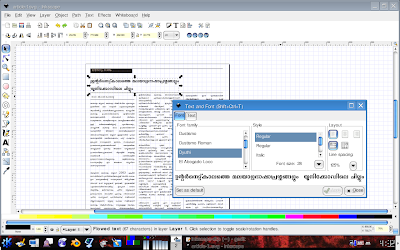
I just tried to design two pages in Malayalam and result was satisfactory.


Thanks to Anivar for pointing out this possibility of Inkscape.
howto handle multipages
in inkscape, you can flow text around from block to block. the only thing you can’t do is handle multi-pages. but if you’re careful with your layouts, you could handle multi-pages in several ways.
a) create a much-larger canvas-sheet, which spans several actual pages. this works best for small publications like brochures, or fan-fold leaflets or similar. print in tiles, or in parts, one page at a time from this sheet.
b) create individual pages. export as ps or pdf. merge them using various pdf tools available under foss.
c) help develop inkscape into a multi-page design and layout software.
hope this helps
niyam
http://flickr.com/photos/niyam
മാസങ്ങള്ക്കു ശേഷം വീണ്ടും ഒരു ഓഫ് ടോപ്പിക്ക്!!!
ഇപ്പോള് ഏതു ഫോണ്ടിലും വിനൂന്റെ “ന്റ” ശരിയായിത്തന്നെ കാണും.
Thanks
Thanks for that note. I do quite a bit of DTP in Malayalam and it is good to learn about your work.
I am still wondering how to do multi-page work in Inkscape. Want to try out different layers.
Philip
Thank you for good post. I think Inkscape is a lot more handy than AI. At least I need more time for the illustrations in AI. I work far faster with Inkscape
zen